
Top 5 Brand New Office Copiers and Printers
The top five office copiers reviewed range from the Kyocera TASKalfa 8052ci for high-speed production (80 ppm mono, 70 ppm color) to the Ricoh IM C4500 for secure, mid-size department use, and the Sharp MX-M7570 for high-volume copying with a walk-up sensor. For lighter needs, the Brother MFC-L2750DW and Canon Pixma TS8320 cover smaller-office and home-office printing.
TL;DR
The article reviews five office copiers and printers spanning different speeds, budgets, and use cases: the Brother MFC-L2750DW (36 ppm mono, NFC, multi-OS support), the Kyocera TASKalfa 8052ci (80 ppm mono/70 ppm color, EFI Fiery support), the Ricoh IM C4500 (45 ppm, built-in browser, tight security), the Canon Pixma TS8320 (an inkjet with voice-control integration, best for home office), and the Sharp MX-M7570 (75 ppm, walk-up sensor, fast digital conversion). Each is available through lease, rental, or purchase depending on the model, giving businesses options across volume and budget.
Key takeaways
- The Kyocera TASKalfa 8052ci is the fastest of the five, at 80 ppm monochrome and 70 ppm color, suited to high-speed production environments.
- The Ricoh IM C4500 (45 ppm) emphasizes security and includes a built-in web browser for printing directly from online images.
- The Sharp MX-M7570 (75 ppm) is built for high-volume copying and uses a walk-up sensor to wake and start printing quickly.
- The Canon Pixma TS8320 is an inkjet aimed at home offices, with voice control through Amazon Echo or Google Home and an extending output tray to protect documents.
- Acquisition options vary by model: some are available to lease, rent, or buy, which lets a business match the machine to its budget and commitment length.
You have so many selections to consider when buying office copiers and printers. The good thing is that this article will guide you with the top choices for your business. You will know you will have the best options, from white to a black printer, to industrial-sized and the best copiers.
Your answers to questions about speed, features, and affordability can help you direct to a printer that will suit your daily business requirements.
| Copier Model | Speed (PPM) / Output | Key Feature / Ideal Use | Acquisition Method |
| 1. Brother MFC L2750DW | 36 ppm (mono); duplex production. | Built-in NFC connectivity; compatible with Linux, Mac, Windows. | Lease/Buy |
| 2. Kyocera TASKalfa 8052ci | 80 ppm (mono), 70 ppm (color); 1200 dpi. | High-speed production; supports EFI Fiery controllers; faster warm-up. | Lease/Buy |
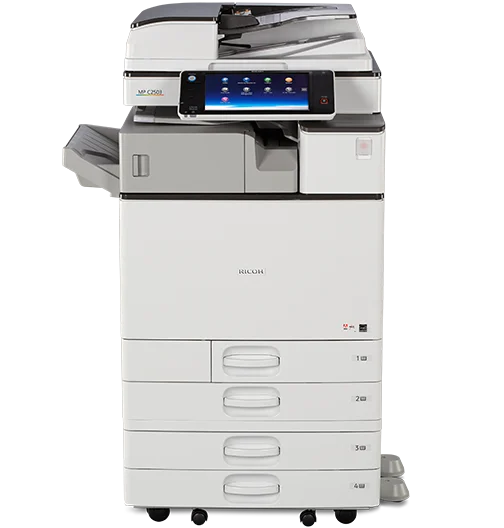
| 3. Ricoh IM C4500 | 45 ppm; 1200 dpi resolution. | Personalized touchscreen, built-in website browser; tight security. | Lease/Rental |
| 4. Canon Pixma TS8320 | Output tray extends; dual-band Wi-Fi. | Voice controls (Amazon Echo/Google Home); ideal for shelf placement/home office. | Buy (Inkjet Focus) |
| 5. Sharp MX-M7570 | 75 ppm; walk-up sensor. | Dependable for high volume; converts copied documents to digital files quickly. | Lease/Rental |
Detailed Printer Reviews
Ricoh IM C4500
This is a reliable copier lease in Boston that prints forty-five pages every minute. You can use it if you have a more extensive or medium-sized department. It comes with high features, making it usable for businesses searching for tight security. One more excellent feature it has is the built-in website browser. You can use it to choose a web image and print right from a copier.
Kyocera TASKalfa 8052ci
This 2016 model of a copier is a cheap and great alternative. It can print around 80 papers for every minute in white and black, plus 70 pages in color. It has many interesting features like a printer, copy, 1200 by 1200 dpi, and fax machine. It best supports business applications.
Canon Pixma TS8320
This printer can be set on a desk corner, shelf, and dedicated cart when you do not use it. Its output tray extends as the printer begins to catch documents, preventing them from becoming damaged or smudged. It comes with excellent copying and scanning capabilities. It also connects with Google Home smart speaker or Amazon Echo to hands-free voice controls.
Conclusion
So, you now learn from a review of brand new office copiers and printers! The Sharp MX-M7570 is helpful for handling copying for high volumes. Copier lease Boston features a walk-up sensor with the machine waking up and printing in a few seconds.
If you plan to get copiers for your office in Boston, you can opt to buy copiers or lease copiers in Boston. Boston Copier solutions provide the best value.
If you plan to get copiers for your office in Boston, you can buy copiers or lease copiers in Boston. We can give you options for getting the copy machine that you want. You can contact our local copier leasing services department in your location.
For all services in Boston, call Clear Choice Technical Services:
- Phone: (617) 221-7774
- Our personnel for copier leasing in Boston will assist you. If you are ready to start the process, request a quote today.
For dedicated Copier Repair Services in Boston, please visit our Repair Services Website for immediate assistance. Our network is powered by Clear Choice Technical Services.